
There isn’t one right way to read a book. Some readers insist on feeling the weight of the latest hardcover in their hands, while others prefer to turn a page onscreen with the swipe of their finger. If you lean toward the digital way, Baldwin has thousands of eBooks available for BPL cardholders to download through our online libraries, OverDrive, Hoopla and EBSCO.
New to reading on a mobile device? The Library is here to help! We can to walk you through the steps and get you reading on the go in no time. Give us a call at 248-554-4650 to set up an appointment.
Access Libby/OverDrive eBooks Access Hoopla eBooks
- Kindle E-Readers
- Fire Tablets – download Libby directly from the Amazon Appstore.
- Fire tablet users who already have the OverDrive app installed can continue to use it for now, but it is no longer in active development and you should consider changing to Libby at this time.
- Users with OverDrive’s Libby APK on their Fire Tablet can continue to use that version. If a user would like to switch to the Amazon Appstore version of the app, they can follow these steps. Note: Users who switch from the APK version to the Amazon Appstore version of Libby may lose their Libby timeline activity, search history, and app customizations. They will not lose their loans, holds, or tags.
- iPad or iPhone – download the Libby app from the Apple App Store.
- Android smartphone or tablet – download the Libby app from the Google Play Store.
- eReaders (Black & White eReaders- not Kindles).
- PC (Windows) Computer
- Mac Computer
- BPL Cardholders are allowed 10 simultaneous checkouts at any time.
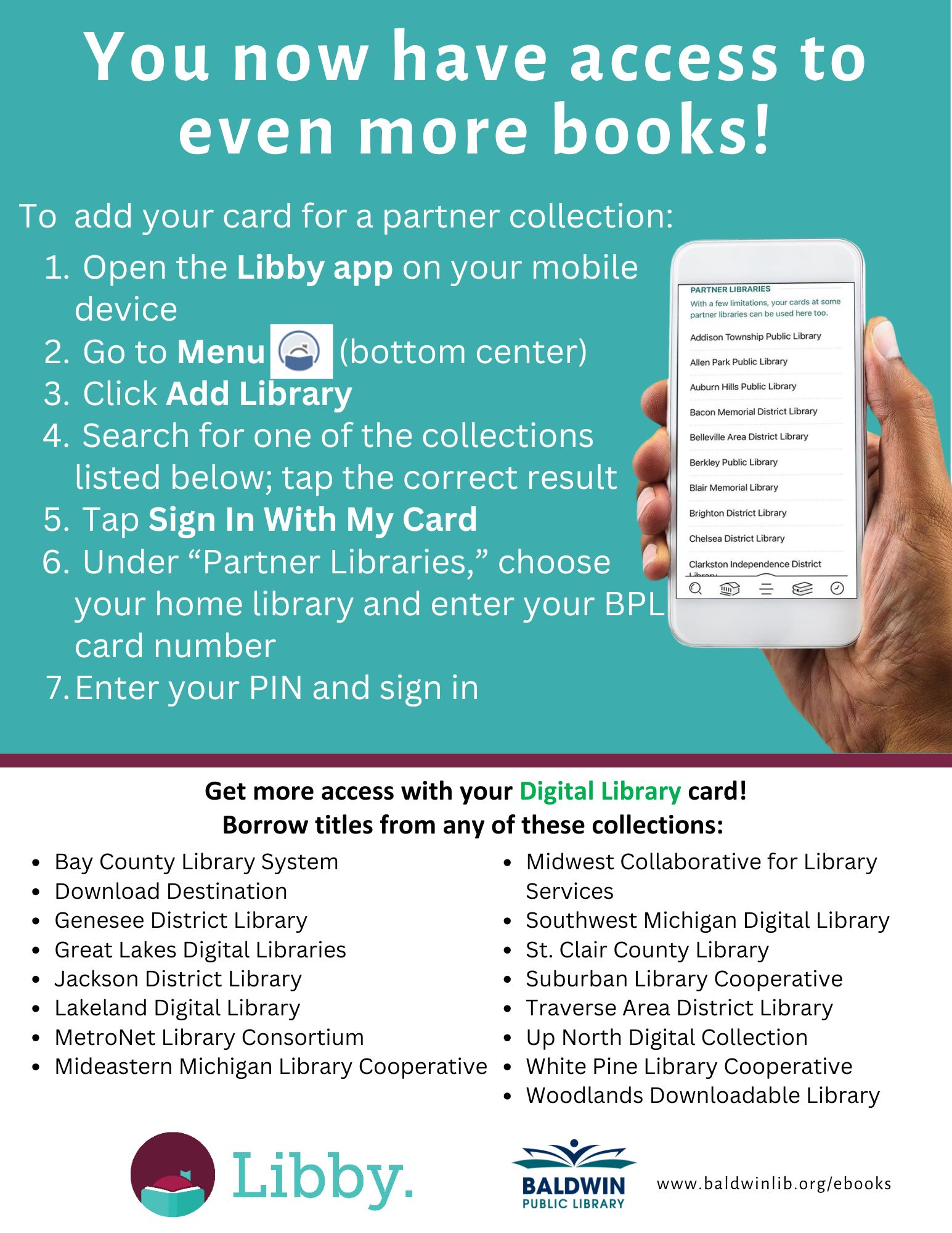
- Baldwin has partnerships with other Michigan libraries, which let you borrow titles from their collections with your BPL Card. Click on flyer below read instructions for borrowing books from other Michigan libraries.
Access Hoopla on your preferred device, then follow the instructions to begin reading:
PC/MAC
- Click “Log In” in the upper right-hand corner.
- Click “Sign Up Now.”
- Choose “Baldwin Public Library” from the drop-down menu and click “Continue.”
- Enter your account information and click “Sign Up Now.”
Mobile Device
- Download the Hoopla app from the Google Play or App store.
- Tap “Sign Up.” You will then see either a drop-down menu or a map with participating libraries, depending on whether your device’s location settings are enabled.
- Choose “Baldwin Public Library.”
- Enter your information and tap “Sign Up.”
BPL Cardholders have the opportunity to borrow 20 items per month.
- Kindle E-Readers
- Fire Tablets – download Libby directly from the Amazon Appstore.
- Fire tablet users who already have the OverDrive app installed can continue to use it for now, but it is no longer in active development and you should consider changing to Libby at this time.
- Users with OverDrive’s Libby APK on their Fire Tablet can continue to use that version. If a user would like to switch to the Amazon Appstore version of the app, they can follow these steps. Note: Users who switch from the APK version to the Amazon Appstore version of Libby may lose their Libby timeline activity, search history, and app customizations. They will not lose their loans, holds, or tags.
- iPad or iPhone – download the Libby app from the Apple App Store.
- Android smartphone or tablet – download the Libby app from the Google Play Store.
- eReaders (Black & White eReaders- not Kindles).
- PC (Windows) Computer
- Mac Computer
- BPL Cardholders are allowed 10 simultaneous checkouts at any time.
- Baldwin has partnerships with other Michigan libraries, which let you borrow titles from their collections with your BPL Card. Click on flyer below read instructions for borrowing books from other Michigan libraries.
Access Hoopla on your preferred device, then follow the instructions to begin reading:
PC/MAC
- Click “Log In” in the upper right-hand corner.
- Click “Sign Up Now.”
- Choose “Baldwin Public Library” from the drop-down menu and click “Continue.”
- Enter your account information and click “Sign Up Now.”
Mobile Device
- Download the Hoopla app from the Google Play or App store.
- Tap “Sign Up.” You will then see either a drop-down menu or a map with participating libraries, depending on whether your device’s location settings are enabled.
- Choose “Baldwin Public Library.”
- Enter your information and tap “Sign Up.”
BPL Cardholders have the opportunity to borrow 20 items per month.